Databases and internal services are typically located inside private subnets when creating secure architectures in AWS. They are shielded from direct internet exposure as a result. However, we frequently run into issues later on when we need to access those resources for testing, debugging, or migrations. It is not a good idea for some people to move the resource to a public subnet or temporarily make it public.
Using a Bastion Host is a much safer and cleaner method. An EC2 instance situated in a public subnet that serves as a safe gateway to the private network is known as a bastion host. We connect to the bastion and use SSH local port forwarding to securely forward traffic through it rather than exposing private resources.
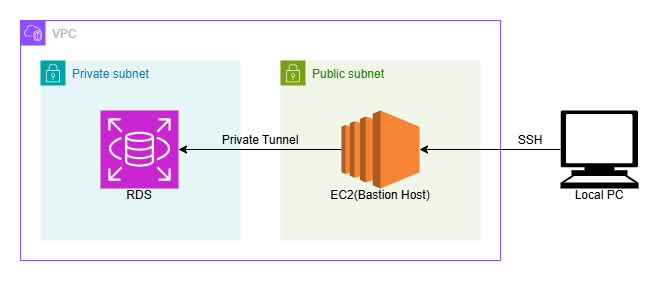
In this tutorial, we’ll use an EC2 bastion host to connect to a MySQL RDS instance in a private subnet.
Architecture Overview
Prerequisites
- EC2 instance in Public Subnet
- Has Public IP
- Allows SSH from your IP
- EC2 key pair
- RDS MySQL in Private Subnet
- No public access
- Security group allows MySQL (3306) from EC2 security group
- Database credentials
- Both resources are in the same VPC
Create SSH Tunnel
From your local machine terminal, run
ssh -i <EC2-Key>.pem -L 3306:<RDS-Endpoint>:3306 <EC2-Username>@<EC2-Public-IP>
Replace:
<EC2-Key>.pemwith your key file name and path<RDS-Endpoint>with your RDS endpoint<EC2-Username>with your EC2 username<EC2-Public-IP>with your EC2 public IP
As long as the SSH session is active, the tunnel is active.
If you don’t want to open an interactive EC2 shell, run it in the background:
ssh -i <EC2-Key>.pem -f -N -L 3306:<RDS-Endpoint>:3306 <EC2-Username>@<EC2-Public-IP>
-Ntells SSH not to execute remote commands-fsends SSH to background
To stop the tunnel later, find and kill the SSH process:
ps aux | grep ssh
kill <process-id>
How does this actually work
SSH creates an encrypted connection between your local machine and the EC2 instance. This is a normal SSH session.
The -L option tells SSH to listen on a local port, in this case 3306. So now your laptop starts listening on 127.0.0.1:3306.
When your MySQL client connects to 127.0.0.1:3306, the traffic does not go to a local database. Instead:
- The traffic enters the SSH tunnel on your machine.
- It is encrypted and sent to the EC2 instance.
- The EC2 forwards that traffic to
<RDS-Endpoint>:3306inside the VPC. - The RDS responds back through the same tunnel.
From your perspective, it feels like the database is running locally, even though the connection is securely being routed through the bastion host to reach the private RDS instance inside the VPC.
Connect to RDS via Localhost
Now you can use any DBMS software to connect to the RDS instance. I’m using Navicat for this example.
Create a New Connection: Open Navicat and click Connection > MySQL. And Fill the fields as below and Click Ok to connect
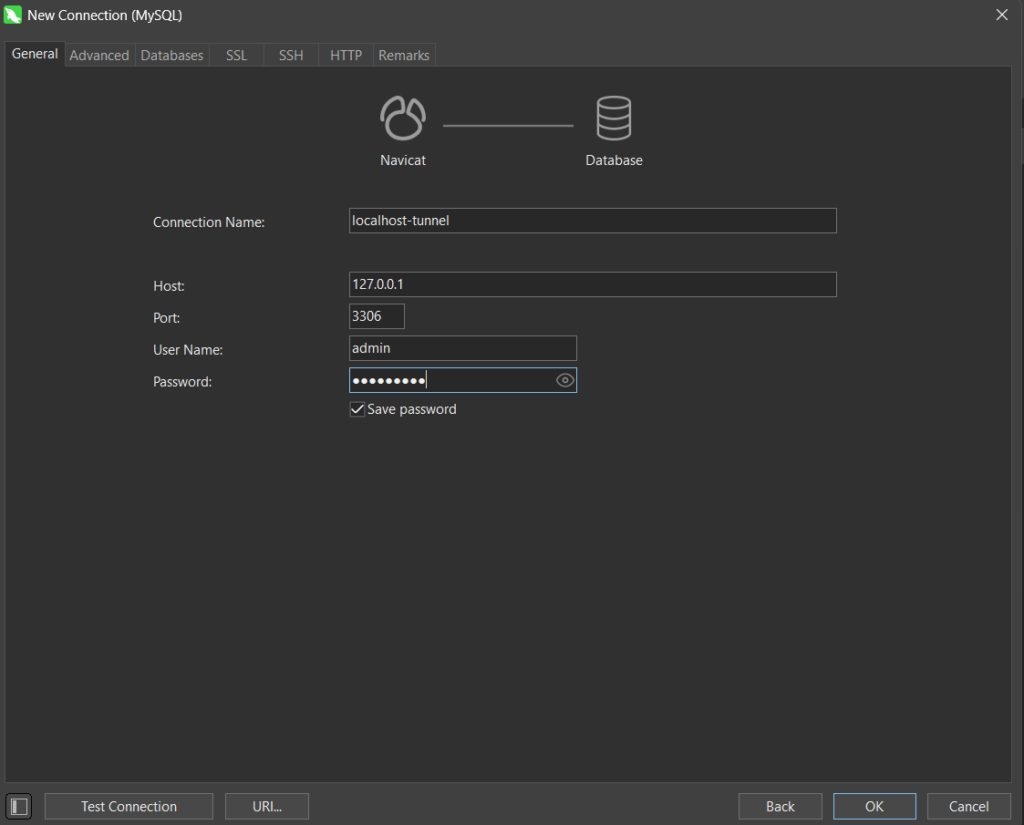
You can also connect using MySQL client through CLI:
mysql -h 127.0.0.1 -u admin -P 3306 -pEnter the database password when prompted and if all works to plan it should connect to the RDS in no time through our ssh tunnel.
Using SSH local port forwarding through a bastion host is a simple yet powerful technique to securely access private VPC resources without compromising architecture. It keeps your infrastructure private while still allowing operational access when needed.
We value your input. Share your thoughts or ask questions by leaving a comment.